從script_fu中學習影像處理技巧:水波動畫
scripts目錄下有超過100個 *.scm檔,這些是學習影像處理技巧的最好教材,在「使用GIMP編輯動畫(四)」這篇文章中已經有討論過水波動畫,本文延續該篇文章,要研究Sven Neumann所寫的waves-anim.scm程式碼是如何產生水波的動畫。
讀了本文你將學會如何寫一個製作簡單動畫的Script-Fu。
一、執行Script-Fu
|
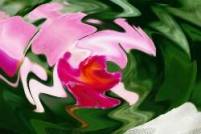
花的水波動畫 |
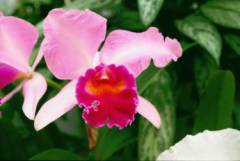
靜止的花 |
|
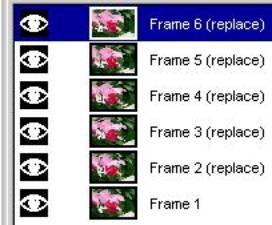
多圖層的動畫 |
l 對上圖,執行[image] -> Script_Fu -> Animators ->Waves使用預設的參數:Amplitude設10、Wavelength設20、Number of Frames設 6,產生左圖。 l Amplitude與Wavelength是根據影像的大小來設定的。小的Amplitude小的Wavelength可產生漣波的效果。 l Number of Frames設 6使得每個畫框的水波相差為60度(360÷6)。 |

使用Gimp圖形界面來編輯影像的每個動作都有相對應的函數,gimp-edit-copy、gimp-edit-paste、gimp-edit-cut對應的便是最常使用的影像複製、影像貼上、影像剪下等動作。
以下我們使用Gimp圖形界面,一步一步作來產生水波動畫。藉由這過程來體會程式碼的意思。
二、使用Gimp圖形界面,一步一步作
|
每個步驟所產生的影像視窗與圖層對話盒 |
以圖形使用者介面產生水波效果的動畫,需要的步驟: |
對應到waves-anim.scm程式碼中的函數 |
|
|
l 首先要計算要產生多少個圖框的動畫。 l 若是6個圖框,則水波的相移phaseshift=360÷6=60度。 |
l num-frames=6 l Phaseshift=60 l 一開始Phase=0 l remaining-frames=6 |
|
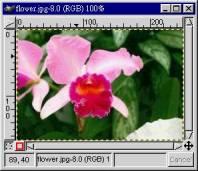
flower.jpg的影像視窗
Background圖層 |
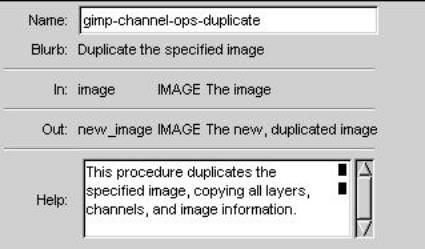
l gimp-channel-ops-duplicate函數的目的是複製一個影像的所有圖層、所有色頻(channels),及相關的所有資料到新的影像物件,gimp-channel-ops-duplicate函數我在Gimp圖形界面上找不到對應的動作。 l 我直接在原本flower.jpg的影像視窗操作,假設flower.jpg影像只有一個名為Background的圖層。 |
46:image (car (gimp-channel-ops-duplicate img))) 47:source-layer (car (gimp-image-get-active-layer image))) |
|
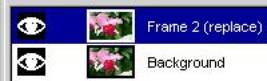
複製Background圖層 |
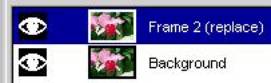
l 在操作圖層的對話盒中,複製Background圖層產生1個新的圖層,將新的圖層更名為Frame 2(replace)。 |
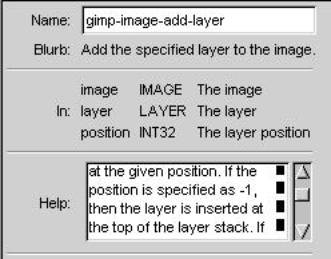
56: (while (> remaining-frames 1) 59: (waves-layer (car (gimp-layer-copy source-layer TRUE))) 60: (layer-name (string-append "Frame” (number->string (- (+ num-frames 2) remaining-frames) 10) " (replace)")) 66: (gimp-layer-set-preserve-trans waves-layer FALSE) 67:(gimp-image-add-layer image waves-layer -1) 68:(gimp-layer-set-name waves-layer layer-name) |
|
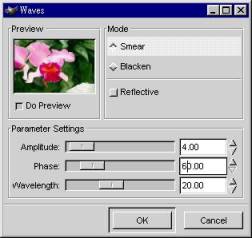
使用Waves濾鏡 |
l 對Frame 2(replace)圖層的影像執行[image] -> Filters -> Distorts -> Waves,Mode設Smear、Amplitude設10、Wavelength設20、Phase設 0,產生左圖。 |
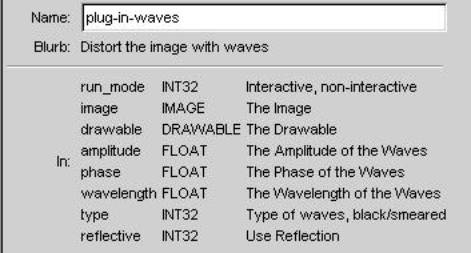
70:(plug-in-waves 1 image waves-layer amplitude phase wavelength 0 FALSE) |
|
重覆上面步驟 |
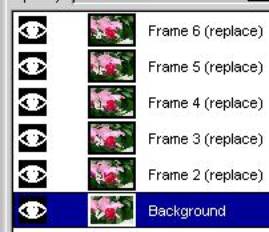
l 重覆上面步驟:# 表3、4、5、6 l 複製Background圖層產生新圖層,圖層更名為Frame # (replace),新圖層要在既有的圖層的上方。 l 對Frame # (replace)圖層的影像執行Waves濾鏡,Phase設(#-2)×-60(為負號),其餘參數照舊。 |
79:(set! remaining-frames (- remaining-frames 1)) 80:(set! phase (- phase phaseshift)) 回到 56: (while (> remaining-frames 1) 判斷是否還要繼續執行 while 迴圈, |
|
花的水波動畫 |
l 將Background圖層更名為Frame 1。 l 對Frame 1圖層的影像執行Waves濾鏡,Phase設360,其餘參數照舊。 l 執行[image] -> Filters -> Animation Playback來播放多圖層的動畫。 l 或存成Gif動畫檔。 |
當remaining-frames>1,結束while 迴圈, 84:(gimp-layer-set-name source-layer "Frame 1") 85:(plug-in-waves 1 image sources-layer amplitude phase wavelength 0 FALSE) |

三、原始程式碼:
|
l 程式碼waves-anim.scm分三部份 l 1~31行:註解,版權宣告。 l 32~58行::(define (script-fu-waves-anim )) ,在測試程式的過程中,我將它改為script-fu-sphere2 l 59~98行:(script-fu-register " script-fu-waves-anim " ) l 我將括號對齊,方便研究程式碼,故行數與原本的檔案不一樣。 |
|
|
1: ; The GIMP -- an image manipulation program 2: ; Copyright (C) 1995 Spencer Kimball and Peter Mattis 3: ; 4: ; This program is free software; you can redistribute it and/or modify 5: ; it under the terms of the GNU General Public License as published by 6: ; the Free Software Foundation; either version 2 of the License, or 7: ; (at your option) any later version. 8: ; 9: ; This program is distributed in the hope that it will be useful, 10: ; but WITHOUT ANY WARRANTY; without even the implied warranty of 11: ; MERCHANTABILITY or FITNESS FOR A PARTICULAR PURPOSE. See the 12: ; GNU General Public License for more details. 13: ; 14: ; You should have received a copy of the GNU General Public License 15: ; along with this program; if not, write to the Free Software 16: ; Foundation, Inc., 675 Mass Ave, Cambridge, MA 02139, USA. 17: ; 18: ; 19: ; waves-anim.scm version 1.01 1997/12/13 20: ; 21: ; CHANGE-LOG: 22: ; 1.00 - initial release 23: ; 1.01 - some code cleanup, no real changes 24: ; 25: ; Copyright (C) 1997 Sven Neumann <sven@gimp.org> 26: ; 27: ; 28: ; Makes a copy of your image and creates an animation of the active layer 29: ; as if a stone was thrown into the image. The animation may be saved with 30: ; the gif-plug-in. 31: |
|
|
32: (define (script-fu-waves-anim img 33: drawable 34: amplitude 35: wavelength 36: num-frames 37: invert) 38: (let* 39: ( 40: (amplitude (max 0 amplitude)) 41: (wavelength (max 0 wavelength)) 42: (num-frames (max 1 num-frames)) 43: (remaining-frames num-frames) 44: (phase 0) 45: (phaseshift (/ 360 num-frames)) 46: (image (car (gimp-channel-ops-duplicate img))) 47: (source-layer (car (gimp-image-get-active-layer image))) 48: ) 49: 50: (gimp-image-undo-disable image) 51: 52: (if (= invert TRUE) 53: (set! phaseshift (- 0 phaseshift)) 54: ) 55: |
num-frames=6 Phase=0 Phaseshift=60 |
|
56: (while (> remaining-frames 1) 57: (let* 58: ( 59: (waves-layer (car (gimp-layer-copy source-layer TRUE))) 60: (layer-name (string-append "Frame " 61: (number->string 62: (- (+ num-frames 2) 63: remaining-frames) 10) 64: " (replace)")) 65: ) 66: (gimp-layer-set-preserve-trans waves-layer FALSE) 67: (gimp-image-add-layer image waves-layer -1) 68: (gimp-layer-set-name waves-layer layer-name) 69: 70: (plug-in-waves 1 71: image 72: waves-layer 73: amplitude 74: phase 75: wavelength 76: 0 77: FALSE) 78: 79: (set! remaining-frames (- remaining-frames 1)) 80: (set! phase (- phase phaseshift)) 81: ) 82: ) 83: |
string-append函數:把字串串接起來。 number->string函數:把數字變字串。 一開始remaining-frames=num-frames, 故num-frames+2-remaining-frames=2 最後合成的字串 "Frame 2 (replace)" |
|
84: (gimp-layer-set-name source-layer "Frame 1") 85: (plug-in-waves 1 86: image 87: source-layer 88: amplitude 89: phase 90: wavelength 91: 0 92: FALSE) 93: 94: (gimp-image-undo-enable image) 95: (gimp-display-new image) 96: ) 97: ) 98: |
|
|
99: (script-fu-register "script-fu-waves-anim" 100: _"<Image>/Script-Fu/Animators/Waves..." 101: "Animate an image like a stone's been thrown into it" 102: "Sven Neumann <sven@gimp.org>" 103: "Sven Neumann" 104: "1997/13/12" 105: "RGB* GRAY*" 107: SF-IMAGE "Image" 0 108: SF-DRAWABLE "Drawable" 0 109: SF-ADJUSTMENT _"Amplitude" '(10 1 101 1 10 1 0) 110: SF-ADJUSTMENT _"Wavelength" '(10 .10 100 1 10 1 0) 111: SF-ADJUSTMENT _"Number of Frames" '(6 1 512 1 10 0 1) 112: SF-TOGGLE _"Invert direction" FALSE 113: ) |
|
四、其他函數的說明:
gimp-channel-ops-duplicate函數
gimp-image-add-layer函數
plug-in-waves函數
46:(image (car (gimp-channel-ops-duplicate img)))
67:(gimp-image-add-layer image waves-layer -1)
70:(plug-in-waves 1 image waves-layer amplitude phase wavelength 0 FALSE)
由DB Browser對話盒的資料可推出第46行、第67行、第70行是什麼意思。